Monday, June 23, 2008
How To Create Click- And- Disappear-Item Presentation
This is a response to one Powerpoint user who wants to remove pictures during presentation once item identified in his/her Powerpoint presentation.

Sunday, May 25, 2008
Powerpoint Presentations - How To Make A Screamer
I assume that this idea is made by a youngster to scare his/her sister. Simple powerpoint prank technique I'd ever seen in my life.
Wednesday, May 21, 2008
Creating Powerpoint Templates To Present Your Business Ideas
I've created this business Powerpoint template in order to make use of the hyperlink feature. Most audiences dislike 200+ powerpoint slides. I'll wear pajamas if I attend this 200+ super-boring presentation.
Read more: The Five Minute Business Presentation Ideas
Tuesday, May 20, 2008
15 Ways of Creating Value For Your Powerpoint Presentations
Here's a list on how to create value for your Powerpoint presentations in order to create slides that people want to see:
- write short/brief points/compact meaning
- use no/less bullets
- optimize the use of text box for your text-contents
- use simple layouts (refer: How To Make Simple And Elegant Business Powerpoint Presentations)
- use more pictures (related ones)
- avoid using complicated animations - bring you most of the problems
- allocate more time for your product promotion
- present your ideas like a storyboard - boost creativity.
- use suitable fonts that increase the impact of your slides
- don't overuse hyperlinks (refer: The Five Minute Business Presentation Ideas)
- minimize the amount of slides used (should not exceed 100 slides)
- put more related quotes in your slides (preferably, inspiring ones).
- make a simple self-introduction by creating business card-like template.
- Use simple graph and charts to summarized your data.
- Use suitable body language which includes facial expression.
Friday, May 16, 2008
How To Please Your Lazy Audience With Your Powerpoint Presentations?
Audiences are like king to us - you need to treat them nicely. Basically, they are indeed lazy in sense of obtaining or absorbing your speech contents. Getting them to buy ideas from you is indeed a difficult task if you're not very to sharing your thought and ideas.
Think out of the box for a while. How could it be possible to attract audiences if you're not willing your knowledge to them? You must have a clear mind that every one of us has something to share. In your Powerpoint presentations, don't expect your audiences will read very single word from the slides. Certainly, you have to make your Powerpoint presentation "speaks".
A good Powerpoint presentation in some circumstances, it doesn't require us to speak that much. It means that this particular presentation able to 'speak' for itself. That's what we called 'standalone' slides. What is 'standalone' slides?
It means that a Powerpoint presentation able to do the talking instead of the speaker.
Whenever I have problems of developing new Powerpoint ideas, this presentation is my personal muse:
Link - http://www.slideshare.net/chereemoore/meet-henry
Based on this, I created one for a DNA testing kit promotion:
Link - http://youtube.com/watch?v=EcCejRMO7vY
It's better to find ways of simplifying the message delivering process to your audiences. Remember, they reject complicated messages - don't try to hard to please them with superfluous information. Every small pieces of information can be perceived at first glance.
I suggest you to read this - Creating five minutes Powerpoint presentations ideas.
Think out of the box for a while. How could it be possible to attract audiences if you're not willing your knowledge to them? You must have a clear mind that every one of us has something to share. In your Powerpoint presentations, don't expect your audiences will read very single word from the slides. Certainly, you have to make your Powerpoint presentation "speaks".
A good Powerpoint presentation in some circumstances, it doesn't require us to speak that much. It means that this particular presentation able to 'speak' for itself. That's what we called 'standalone' slides. What is 'standalone' slides?
It means that a Powerpoint presentation able to do the talking instead of the speaker.
Whenever I have problems of developing new Powerpoint ideas, this presentation is my personal muse:

Link - http://www.slideshare.net/chereemoore/meet-henry
Based on this, I created one for a DNA testing kit promotion:
Link - http://youtube.com/watch?v=EcCejRMO7vY
It's better to find ways of simplifying the message delivering process to your audiences. Remember, they reject complicated messages - don't try to hard to please them with superfluous information. Every small pieces of information can be perceived at first glance.
I suggest you to read this - Creating five minutes Powerpoint presentations ideas.
Thursday, May 15, 2008
How To Prepare An Oscar® Acceptance Speech
Ari Sandel is great at making such an acceptance speech in brief 60 seconds. If you think ahead, minimize your presentations and make it as brief as possible actually squeeze very sap of your brains. It is extremely difficult to do - unless you're Ari Sandel in this case.
Well, someone has figured Pecha Kucha - brief Powerpoint presentations which limited to 20 slides with 20 seconds per slide.
This gives a boost of creativity. I believe it will eventually works in business presentations.
Watch the video here.
Well, someone has figured Pecha Kucha - brief Powerpoint presentations which limited to 20 slides with 20 seconds per slide.
This gives a boost of creativity. I believe it will eventually works in business presentations.
Watch the video here.
What Is Actually Business Card Powerpoint Presentations?
In every formal meetings, mot probably we'll hand our business or contact card to our clients as first acquaintance. As for informal ones like casual events, we'll just distribute it among family and friends so that they can know you much better.
Business card is still an undying art - it just get better over the past few years and now, it's getting trendier!
Like this guy from Gapingvoid.com - who created art on the back of business cards had his work featured in Seth Godin's 'The Big Moo' book. This guy probably earns a lot of money by creating his unique business cards for his customers. You should check out his gallery of his cards on his website. By the way, you'll get to see some of his works in a widget at the left sidebar of this blog.
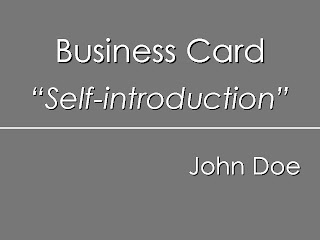
Like I said earlier, business cards are getting trendier. I had written an article a week ago about how to introduce yourself or your company services by creating a simple layout which resembles a business card layout:

Classy-black-and-white layout.
Business card is still an undying art - it just get better over the past few years and now, it's getting trendier!
Like this guy from Gapingvoid.com - who created art on the back of business cards had his work featured in Seth Godin's 'The Big Moo' book. This guy probably earns a lot of money by creating his unique business cards for his customers. You should check out his gallery of his cards on his website. By the way, you'll get to see some of his works in a widget at the left sidebar of this blog.
Like I said earlier, business cards are getting trendier. I had written an article a week ago about how to introduce yourself or your company services by creating a simple layout which resembles a business card layout:

Classy-black-and-white layout.

Grey layout looks fine as well.
This method shorten your introductory speech so you can allocate more time for promoting your product and company services to your clients.
If you want to know more about it, here's the link.
If you want to know more about it, here's the link.
Subscribe to:
Posts (Atom)


